 Oratella
Listen to your books and articles
Oratella reads your EPUB, PDF, Word, Markdown and text files aloud. It runs on your phone and your computer. Add a web article from its link, and it reads that too.
Free, with no account and no ads. Free, with no account and no ads. The beta needs Android 8 or later. Free, with no account and no ads. For Windows 10 and 11. Windows may warn you once: see the steps. Free, with no account and no ads. For macOS 13 or later. The first time, macOS asks you to allow it: see the steps. Coming soon to iPhone and iPad. Oratella is on Android, Windows and Mac now.
Pride and Prejudice by Jane AustenChapter 1
It is a truth universally acknowledged, that a single man in possession of a good fortune, must be in want of a wife.
However little known the feelings or views of such a man may be on his first entering a neighbourhood, this truth is so well fixed in the minds of the surrounding families, that he is considered the rightful property of some one or other of their daughters.
Press play to listen0:00
These are the natural voices from the app. On your phone or computer they run with no connection. Tap a word to listen from there.
It reads what you are meant to read
Papers, reports and course readings are full of page clutter. Oratella skips page numbers, running headers, footnotes, citations and licence lines. It reads the text itself, and says prices and numbers the way you would.
- EPUBBooks, with their chapters and cover
- PDFPapers and reports with a text layer
- Word.docx documents, with their headings
- Markdown and textNotes, drafts and Project Gutenberg books
- Web articlesShare a page to Oratella, or paste its link, and listen later
The quiet return of night trains
Night trains nearly disappeared from Europe in the 2010s1. Operators judged them too costly to run (Porter, 1985; Lee et al., 2019). Since then, new routes have opened between most large cities, and many of them sell out weeks ahead.
For the exclusive use of M. Lindqvist, 2026. Travellers say they choose the train to sleep on the way. They arrive in the centre of the city, rested.
1 Figures from the national rail operators, 2011 to 2016.
14
This is a page as it was printed.
Start a chapter on your phone, and finish it on your computer
Oratella reads the same files with the same voices on each system. Sync carries your library and your place between them.
-
AndroidYour device
Closed beta on Google Play
Phones and tablets with Android 8 or later.
Join the Android beta -
WindowsYour device
Available
Windows 10 and 11, 64-bit. It installs with normal user rights.
Download for Windows -
MacYour device
Available
macOS 13 or later, on Apple silicon and Intel. It needs one extra step the first time you open it.
Download for Mac -
iPhone and iPadYour device
Coming soon
Write to us, and we tell you when it is ready.
Tell me when it is on iPhone
Downloads for Windows and Mac come from GitHub, where every version is listed. Read the install steps for each system.
Your library, in your private cloud
Sync keeps your books, places, bookmarks and settings the same on your phone and computer. You can protect the synced copy with a password of your choice.
Uploaded to your private cloud
Oratella uploads your library to your Google Drive or Dropbox. It uses only the Oratella folder there. Your library goes straight from your device to your cloud.
Protected with your password
With a password, Oratella encrypts your library on your device before upload. Only you know the password. Each of your other devices asks for it once.
Keep your password safe
Keep it in a safe place, such as a password manager. If you forget it, you can start the synced copy again with a new password.
Automatic
Sync runs when you open Oratella, pause or leave a book. Turn it on in Settings, then Library, then Sync.
- Androidphone
- Windowscomputer
- Maccomputer
Locked with your passwordEncrypted on your device before upload, with AES-256-GCM
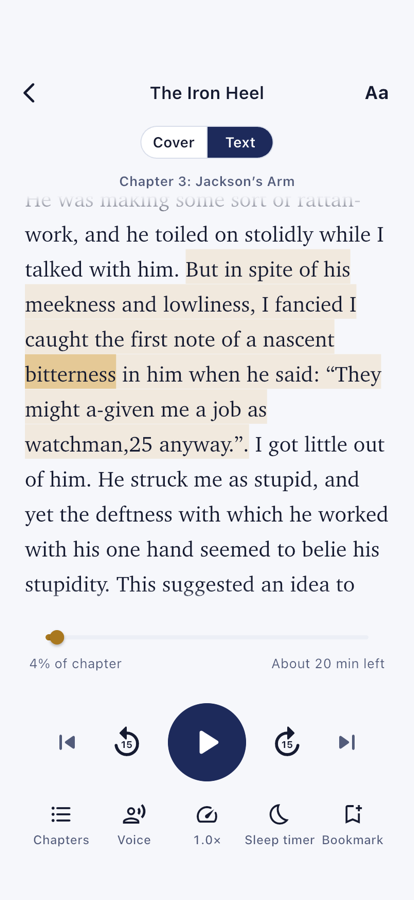

Follow along, and never lose your place
Read along shows the chapter as it is read. The spoken word is highlighted, and the text follows it. Tap a word to listen from there.
Your place in every book
Oratella remembers the word where you stopped. The book you were listening to waits at the top of the library.
Chapters and bookmarks
Jump to a chapter, or mark a passage to come back to it.
A page that suits your eyes
Choose a light, sepia or dark page. Set the font, the text size and the line spacing.
Speed and sleep timer
Listen at the pace that suits you. The timer stops reading at the time you choose. Natural voices fade out gently.
Lock screen
Play and pause from the lock screen while the phone stays in your pocket.
Natural voices that work offline
Natural voices sound like a person reading, a step beyond plain text to speech. Oratella downloads the voices once. After that they work offline, on a plane or in a tunnel.
Natural voices
18 voices in English, with American and British accents. The download is 94 MB or 334 MB. Oratella asks before it uses mobile data.
The voices of your device
Free for everyone, in every language your phone or computer can speak.
Your books stay private
The voice runs on your device. The text of your books stays with you.
Music or nature under the voice
Play piano, guitar, harp, rain, ocean waves and more under the voice. Oratella composes each sound on your device. The sound fades out with the voice when the sleep timer ends.
Your library stays on your devices and in your private cloud
Straight from your device to your cloud
The voice runs on your device. Sync uploads your library straight to your private cloud. Set a sync password, and the copy is private from your cloud company too. The cloud then sees only the number of files, their size and the sync times.
No account, and no ads
You can use Oratella without signing up. The privacy policy lists everything the app sends.
Questions
Which devices does Oratella run on?
Android phones and tablets with Android 8 or later, in a closed beta for now. Join the Android beta.
Computers with Windows 10 or 11, 64-bit, and Macs with macOS 13 or later. Download it for Windows or Mac.
Oratella is coming soon to iPhone and iPad. To hear when it is available, write to support@oratella.app.
Can I start a book on my phone and finish it on my computer?
Yes. Turn on sync on both, with the same Google Drive or Dropbox account. Pause on one device, and the other continues from that word after its next sync. Oratella syncs when you open it, pause or leave a book. To sync at once, open Settings, then Library, then Sync, and press Sync now.
How do I add a book?
Press Add in the library and choose a file. On a phone, you can also share a file to Oratella from Files or Mail. On a computer, right-click a file and choose Open with, then Oratella.
For a web article, paste its link. On a phone, you can also share the page to Oratella.
Which clouds can I sync with?
Google Drive and Dropbox, on Android, Windows and Mac. On iPhone and iPad, iCloud Drive will be offered as well. The copy is kept in your account with that cloud. Oratella asks Google only for the files it created itself. In Dropbox, it uses only the Apps, Oratella folder.
What does the sync password protect?
With a password, Oratella encrypts your synced data on your device before upload. This covers your books, places, bookmarks and settings. Your device turns the password into a key with Argon2id. This method makes guessing slow. The key locks your data with AES-256-GCM, a standard cipher.
Your cloud then sees the number of book files and their rough size. It also sees which devices synced, and when. Titles, authors, text, places, bookmarks and settings stay private. Only you know the password, and it stays on your devices.
What if I forget the sync password?
Keep the password safe, because only you know it. If you forget it, choose Forgot the password in Sync on one of your devices. Oratella then uploads the library of that device again, with a new password. Your other devices add their books back after you enter the new password on them.
Can I save articles to listen to later?
Paste a link in the library, or share a page to Oratella from your browser. Oratella saves the text, so the article plays offline. In Settings, then Library, you can clear finished articles after a time you choose.
Can Oratella read a scanned PDF?
No. A scanned PDF is a picture of each page, with no text inside. Oratella tells you when a PDF has no text to read. A PDF made from a document, such as a paper or a report, works well.
Which languages can it read?
The voices of your device read every language your phone or computer supports. You can add more in its settings. The natural voices read English, with American and British voices.
Does it work without a connection?
Yes. Your books, saved web articles and natural voices are all on your device. Oratella needs a connection only to add a web article, download a voice and sync.
Why does my computer warn me before it opens Oratella?
Windows and macOS ask once before they open an app they do not know yet. Apple has not notarised Oratella for Mac yet. The Windows installer is not signed yet. The download page shows the steps.
For any other question, write to support@oratella.app. Our answers are in English.
Put on the book you have been meaning to read
On Android in a closed beta, on Windows and on Mac. Coming soon to iPhone and iPad. See every device and its status.